





A practical guide to the real AI options available to your company, and why the right answer usually isn’t “build a model” or “buy a chatbot.”
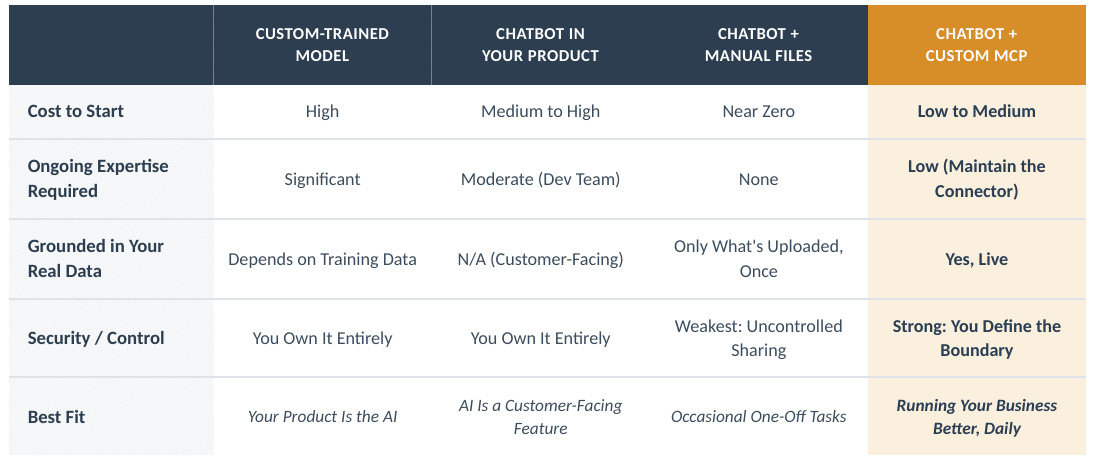
Most executives don’t have an AI strategy problem. They have an AI clarity problem. “AI” gets used to describe four or five genuinely different things — a custom-trained model, an embedded chatbot feature, an employee pasting files into ChatGPT, a system that can query your ERP — and each one has a different cost, a different risk profile, and answers a different question. Before you spend anything, it’s worth being clear on which one you’re actually talking about.
Here’s a direct comparison of the options, why one stands out, and what it looks like once it’s running.
The Four Real Options
- Custom-train your own AI model.
Building or fine-tuning a model from scratch means owning the infrastructure, the training data pipeline, and the ongoing maintenance that comes with keeping a model current. That’s a real specialty, and it’s usually only worth it if your business is the model: a product built around a highly specialized, proprietary capability that a general-purpose model can’t offer off the shelf. For running your operations more effectively, this is almost always the wrong tool. It’s expensive, slow to stand up, and it puts you in the business of maintaining AI infrastructure instead of running your business.
- Integrate a chatbot API directly into your own platform.
This is building AI into a product you sell, such as a support widget on your website or a feature inside your app. It’s a legitimate path if AI is meant to be part of your customer-facing offering. But it’s a product engineering investment, not an operations tool, and it doesn’t do much for the day-to-day question of how to make your own team faster.
- Use general-purpose chatbots as-is, uploading files when you need answers.
This is what most companies are already doing, informally, today. It’s cheap and it’s fast to start. It’s also a dead end for anything that matters: every answer is only as good as whatever file someone remembered to upload that day, there’s no live connection to your actual systems, and depending on what people are pasting in, you may be handing sensitive business data to a third party with no control over where it goes or who else can see it. It’s fine for a one-off, but it’s not a system.
- Connect the chatbots you already use to your real systems with a custom MCP.
MCP (Model Context Protocol) is an AI connector standard that lets a chatbot securely query and act on a specific system, such as your ERP, your CRM, or your project data — instead of relying on whatever a person happened to type in or upload. Done well, it’s the difference between an AI that’s smart in general and one that actually knows your business.
Why We Recommend An MCP
The AI chatbots your team already uses are built and maintained by organizations whose full-time job is making the underlying model better, safer, and faster. That’s expertise you get for free, continuously, without hiring for it. Trying to replicate that in-house with a custom-trained model means competing with that investment, which most companies simply don’t need to do.
The gap isn’t the chatbot. It’s that the chatbot can’t see anything real about your business unless someone manually feeds it. A custom MCP closes that gap on your terms: it’s a connector you build and control, so you decide exactly what data it can read and what actions it’s allowed to take. That’s a meaningfully different security posture than an employee copy-pasting a spreadsheet into a public chat window. The MCP is a defined, auditable boundary; ad hoc file-sharing is not.
What This Actually Looks Like: An Example and a Roadmap
Say someone on your team asks the chatbot: “Which of our active projects are behind schedule, and why?”
Without an MCP, the chatbot can only guess or ask you to paste in a status report. With a custom MCP connected to your project system, the chatbot queries live data, pulls the actual milestones and dates, and gives a grounded, specific answer — the kind you could act on, not the kind you’d need to double-check.
The real payoff comes next: that question and the way it should be answered doesn’t have to live in one person’s head. Once you’ve worked out a good version of it, you turn it into a skill. A skill is a saved, reusable set of instructions the chatbot follows every time that question (or one like it) comes up. Publish that skill once, and every person in the company can ask the same well-formed question and get a consistent, reliable answer, without needing to know how to write the query themselves.
A realistic rollout looks like this:
- Pick one recurring, high-value question your team already asks manually: cylinder reporting, order lookups, billing discrepancies, or whatever costs the most time today.
- Connect a custom MCP to the one system that question depends on. Start narrow.
- Test it with the actual person who’d use it, not just IT. Refine until the answer is genuinely trustworthy.
- Package it as a skill and document what it does and doesn’t cover.
- Publish it company-wide so it’s available to everyone, not just the person who built it.
- Repeat with the next question, expanding to new systems as confidence builds.
None of this requires becoming an AI company. It requires being deliberate about which of the four options above you’re actually choosing, and giving the chatbot your team already trusts a real, controlled window into the business it’s supposed to help run.
Solution Source is a NetSuite Solution Provider who specializes in helping gas distributors evaluate and implement ERP software. To learn more and get a consultation, visit our website.